
How to Print DTF on Black Shirt?
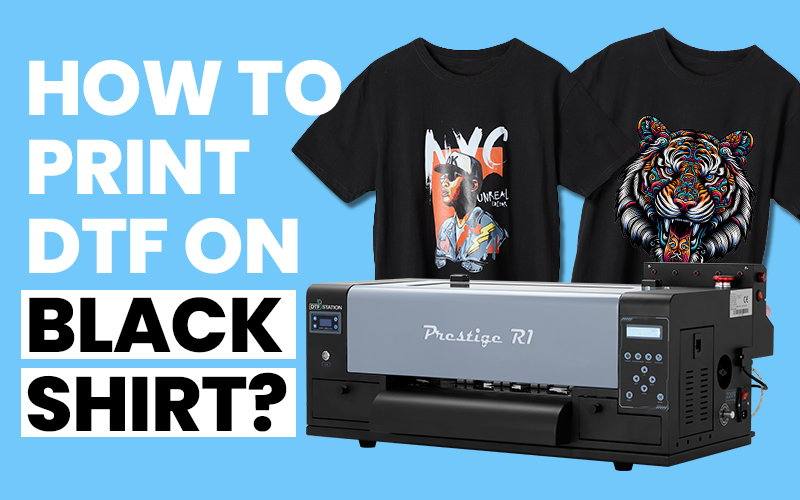
Black shirts have become a staple in every wardrobe, loved for their versatility, sleek appearance, and the striking contrast they create with vibrant designs. However, many traditional printing techniques like sublimation struggle to achieve those bold, bright prints on dark fabrics. The challenge is real: how can you create vibrant, high-quality designs that truly pop on black shirts? That’s where DTF (Direct-to-Film) printing comes in, offering an easy and efficient solution to this common problem.
In this article, we’ll guide you through how to print DTF on black shirts, helping you tackle the unique challenges of printing on dark fabrics. From designing the perfect artwork to a step-by-step process for successful DTF printing, we’ve got you covered. We’ll also share expert tips to enhance color vibrancy and ensure your designs stand out. If you’re ready to overcome the limitations of traditional printing methods and elevate your DTF printing game, this guide is for you.
Why Black Shirts Are a Lucrative Market Opportunity?
Black shirts aren’t just a fashion choice—they’re a business goldmine. Here’s why it presents an exciting opportunity for businesses:
- Flattering for All – Black suits everyone, offering a slimming effect and complementing any skin tone.
- Endlessly Versatile – Perfect for any occasion, whether casual or formal, making it an easy choice for customers.
- Low Maintenance – Black hides stains and wear, offering longer-lasting appeal.
- Ageless Appeal – Black never goes out of style. Its timeless nature makes it a wardrobe staple that transcends seasonal trends.
- Perfect for Designs– Black is an ideal backdrop for bold graphics, making custom prints stand out.
For businesses, black shirts represent a steady and reliable product that appeals to a wide range of customers. Whether you’re printing custom designs or offering a basic staple, black shirts are a profitable niche worth tapping into.
Why Choose DTF Printing for Black Shirt Printing?
When printing on dark fabrics, many traditional methods fail to achieve the vibrant colors and fine details needed for stunning designs. This is where DTF (Direct-to-Film) printing excels, offering several distinct advantages for businesses.
Vibrant Colors
DTF printing uses high-quality inks and films that maintain their brightness and vibrancy on dark fabrics, making your designs stand out with bold, rich colors.
Fine Details
DTF captures intricate designs, fine lines, and complex gradients, ensuring your artwork appears sharp and precise on black shirts.
Material Versatility
Whether you're printing on cotton, polyester, or fabric blends, DTF transfers are highly versatile and deliver consistent results on a variety of fabrics.
Quick Setup & Low Costs
Compared to other methods, DTF printing offers a faster setup time and lower costs, making it an efficient and budget-friendly solution for custom orders and small batches.
Durability
Prints created with DTF technology are long-lasting, resisting fading, cracking, and peeling even after multiple washes, ensuring high-quality results over time.
How to Design for Black Shirt Printing?
Designing for black shirts requires a slightly different approach to ensure your artwork pops and looks sharp. The key is to work with the contrast of dark fabric, choosing colors and designs that stand out, while also considering how to use DTF printing to highlight intricate details. In this section, we’ll walk you through some essential tips for creating eye-catching designs specifically tailored for black shirt printing.
TIP 1: Let Black Work for You!
Removing the background from your DTF design is crucial for achieving a clean, professional look. By eliminating excess ink and adhesive, you not only reduce stiffness but also enhance breathability, allowing the fabric to “show through.” Start with a transparent background in your design software, use the shirt color creatively, and incorporate negative space to create a seamless, comfortable print.
TIP 3: Choosing The Right Color Modes!
Since RGB offers a wider color gamut, it’s essential to start your design in RGB mode for the most vibrant and diverse color options. Avoid converting your design to CMYK prematurely, as this can dull the colors and reduce vibrancy. Once your design is ready, preview it in CMYK mode to understand how the colors will shift when printed, then let professional RIP software handle the final conversion for optimal color reproduction.
TIP 5: Use the Recommended Design Resolution for Crisp Prints!
For high-quality DTF transfers, it’s essential to use the right resolution to ensure sharp, vibrant prints. The industry standard is 300 DPI (dots per inch), which delivers the necessary detail and clarity for professional results. Using a lower resolution can lead to pixelation or blurred prints, so always design your artwork at 300 DPI to ensure vibrant colors and crisp details in your final transfer.
Tip 7: Adjust Color Settings for Vibrant Prints!
To enhance color vibrancy, adjust key settings like brightness, contrast, and levels. Increase brightness for more pronounced colors, adjust contrast for depth, and fine-tune levels for balanced shadows and highlights. Use vibrance to enrich muted colors without overpowering, and apply rich blacks by mixing CMYK inks for a deeper, bolder effect. These tweaks will ensure your design pops with vibrant, professional results on black shirts.
TIP 2: Using Halftones!
Halftones are a powerful technique in DTF printing, creating a soft, continuous tone by blending tiny dots of ink. This method not only lightens the print for a more flexible and breathable feel but also enhances the design’s detail, especially in gradients or photographs. By incorporating halftones, your design will blend smoothly with the shirt color, adding depth and giving the print a polished, professional finish.
TIP 4: Choose the Right File Type – Vector vs. Raster!
The file type you use plays a crucial role in the quality and vibrancy of your prints. Vector files (AI, EPS, PDF) are ideal for designs with solid colors and sharp lines, as they can be scaled infinitely without losing quality. On the other hand, raster files (JPEG, PNG, TIFF) are better suited for detailed images or photographs, but their quality depends on resolution—so always use high-resolution formats to preserve clarity. For the best results, stick to vector files for sharp graphics and use high-res raster formats like PNG or TIFF for detailed imagery.
TIP 6: Choose Colors That Pop on Black Shirts!
When designing for black shirts, it’s crucial to choose colors that stand out against the dark fabric. Bright, bold hues like neon greens, vibrant blues, and fiery reds create striking contrasts, making your design really pop. Lighter or pastel shades can also work well, giving a soft, subtle effect. However, always test your chosen colors on a black background to ensure they stand out as intended—this small step can elevate your design from ordinary to eye-catching.
Tip 8: Test Your Design on Virtual Black Backdrops!
Before finalizing your design, always set your design tool’s background to black. This simple trick allows you to see how your colors and elements interact with the dark fabric in real time. It’s a surprisingly effective way to ensure your design looks vibrant and well-balanced before going to print.
Check Our Ultime Design GuideHow to Print DTF on Black Shirt Step by Step?
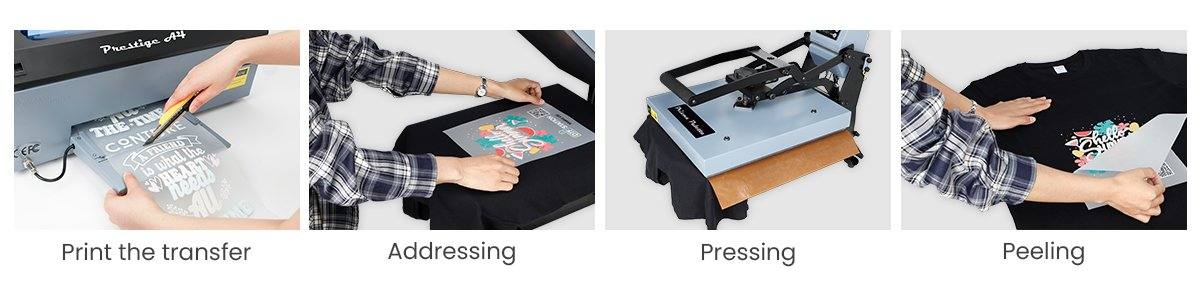
- Set Up the Workspace: Organize your printer, heat press, and supplies for an efficient workflow.
- Print & Cure Transfer: Print your design on DTF transfer film and cure it with powder shaker.
- Place the Transfer: Align the transfer on the black shirt, ensuring it’s centered. Click to check our design placement design guide.
- Heat Pressing: Press at the required temperature and pressure for the material and film. Click to check ultimate heat press guide!
- Peel the Film: peel off the carrier sheet to reveal the vibrant design.
Tips for Optimal DTF Prints on Black Shirts
To achieve the best results with DTF printing on black shirts, it’s important to fine-tune your process. From choosing the right materials to adjusting settings, these tips will help you achieve vibrant, long-lasting designs with a professional finish. Follow these guidelines to elevate your DTF printing game!
Adjust Heat Settings for Black FabricBlack fabrics often require slight adjustments to heat settings due to their density and ability to absorb more heat. For best results, increase the heat by a few degrees (around 320°F or 160°C) and ensure that the pressing time is sufficient (typically 15-20 seconds). Too low of a temperature can lead to poor adhesion, while too high can damage the fabric or cause discoloration.
Use Black DTF PowderWhen printing on black shirts, using black DTF powder is an excellent way to enhance the print’s overall quality. Unlike regular white powder, black DTF powder blends more seamlessly into the design, reducing any visible contrast and preventing unsightly edges around the print. This allows for cleaner, more professional-looking results that don’t compromise the vibrancy or detail of your design. Additionally, black powder ensures better color adhesion, making your prints last longer while keeping them flexible and soft to the touch.
Post-Press for a Polished FinishAfter the initial heat press, performing a post-press can significantly enhance the quality of your DTF print on black shirts. This extra step helps to ensure that the transfer is fully bonded to the fabric, reducing the risk of peeling or cracking over time. A short post-press at a slightly lower temperature can also help to smooth out any uneven areas and improve the overall feel of the print. It’s a simple yet effective technique to give your DTF prints a more professional, durable, and soft finish, especially on dark fabrics.
Use High-Quality SuppliesThe quality of all your DTF supplies—transfer film, powder, inks, and accessories—greatly impacts the final result. High-quality films provide better adhesion and smoother transfers, while premium inks offer brighter, more vibrant colors that last longer. Using high-grade adhesive powders ensures strong, durable prints without cracking, and top-notch accessories like precision heat presses and printers make a significant difference in achieving consistent, professional-quality prints. Investing in quality supplies will ensure the best outcome for your DTF prints on black shirts.
Pre-Press the ShirtPre-pressing the shirt helps to remove any moisture and wrinkles that could interfere with the transfer. This step creates a smooth, flat surface, ensuring the transfer adheres properly and evenly. Pre-pressing for 5-10 seconds at a moderate temperature (around 320°F or 160°C) will also help the fabric expand, making it easier to apply the transfer without distortion.
Test Designs Before Full ProductionTesting your design on a sample shirt is a vital step before moving into mass production. By doing a test print, you can evaluate how the colors appear on the black fabric and check for any issues like misalignment or ink bleeding. It also helps to confirm the durability of the print and make sure that the adhesive bonds properly. This prevents costly mistakes in large batches.
Store Transfers ProperlyAfter printing your DTF transfers, it’s essential to store them correctly. Keep transfers in a cool, dry area, away from direct heat or humidity, which can damage the transfer or affect its performance. If you are storing transfers for a longer period, place them flat in a storage container to prevent any bending or distortion that could compromise their quality when applied to shirts.
Conclusion
Printing on black shirts offers incredible potential for business owners looking to tap into a growing market. With DTF printing, you can achieve vibrant designs and unmatched durability, making it the perfect choice for dark apparel. By following the detailed steps on how to print DTF on black shirts, you’ll be able to elevate your designs and deliver exceptional results. Whether you’re looking to start a business or simply enjoy the process of creating, the potential is limitless. If you like the post or find it helpful, please share it to spread the joy and knowledge to help more people!
Got Questions?
If you have any questions or need further assistance with printing DTF on black shirts, don’t hesitate to reach out! Our team of experts is ready to provide you with the support and guidance you need to achieve the best results.