
DTF Color Correction: Your Guide to Perfect Color Reproduction
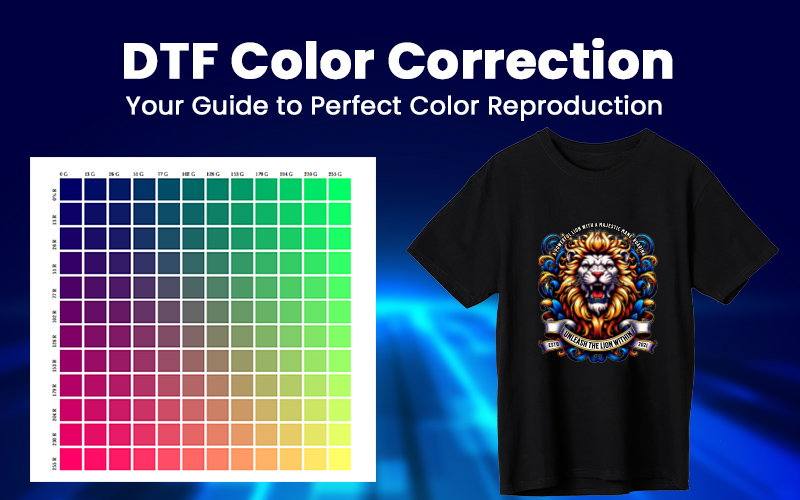
Frustrated by customers complaining that their prints don’t match the design? You’re not alone. Color inaccuracies in DTF printing can lead to wasted transfers, unhappy clients, and lost profits. But here’s the good news—getting true-to-design colors every time isn’t luck; it’s science. Whether you’re a printing business owner, dealer, or distributor, this guide will break down exactly how color correction works, the key factors affecting accuracy, and actionable steps to ensure perfect prints—so you can deliver consistent quality, boost customer trust, and stand out in a competitive market. Let’s fix color mismatches for good.
Table of Contents
- Why color accuracy is so important for your printing business?
- What’s color correction?
- Factors to Consider & Tips to Get Perfect Color Accuracy
- A. Design File Preparation: The Foundation of Color Accuracy
- B. ICC Profiles: The Color Translator
- C. Waveforms: The Ink Delivery Controller
- D. RIP Software: Executes the Plan by ICC Profiles
- E. Printer Performance: The Engine of Color Accuracy
- F: Consumables: The Hidden Variable in Color Accuracy
- Environmental Factors Affecting Color Accuracy
- Conclusion
Why color accuracy is so important for your printing business?
Color accuracy isn’t just a technical detail—it’s a make-or-break factor for your printing business. Here’s why getting it right matters:
1. Brand Integrity at Stake: When colors deviate from expectations, you’re not just delivering prints – you’re risking brand identities. Luxury fashion houses, corporate clients, and even small businesses rely on precise color reproduction to maintain their visual identity across all materials.
2. Profit Erosion Through Hidden Costs: Every color mismatch triggers a chain reaction of expenses: reprints, rush shipping, wasted materials, and labor hours spent troubleshooting. These costs compound quickly, silently eating into your margins.
3. The Trust Factor: In the print business, trust is currency. Consistent color accuracy builds reliability in your brand, while inconsistencies create doubt. Clients who experience color issues may never return, and worse – they’ll share their dissatisfaction.
4. Competitive Disadvantage: The market increasingly demands perfection. Print buyers now expect color-accurate results as standard, not premium service. Businesses that can’t guarantee accuracy automatically lose bids to those who can.
5. Operational Inefficiency: Color inconsistencies create bottlenecks in production. Each correction cycle disrupts workflow, delays other jobs, and strains staff resources. This operational friction limits your capacity and scalability.
What’s color correction?
Now that we’ve seen how color inaccuracies hurt your business, let’s talk about your secret weapon: Color Correction. Think of color correction as a precision tuning process-it is the systematic process of adjusting digital color values to ensure accurate reproduction in physical prints. It bridges the gap between what you see on screen and what appears on your final product – a critical step that separates professional results from amateur mistakes. However, to achieve truly perfect prints every time, you need to master factors that determine real-world color accuracy before color correction.
Factors to Consider & Tips to Get Perfect Color Accuracy
A. Design File Preparation: The Foundation of Color Accuracy
The design file isn’t just artwork – it’s the DNA of your print results. When files arrive in RGB (the standard for digital design) but print in CMYK (the reality of physical production), you inherit three unavoidable problems:
- The Gamut Gap: RGB color space can display approximately 1 million more colors than CMYK can physically reproduce. This fundamental limitation causes automatic 15-20% desaturation of vibrant blues and greens during conversion. Particularly noticeable in neon tones and deep emerald hues where CMYK struggles most.
- Black Generation Issues: Pure RGB black (0,0,0) typically converts to a weak CMYK mix (C75 M68 Y67 K90), resulting in text appearing charcoal-gray rather than true black and shadow areas losing depth and detail without manual ink balancing.
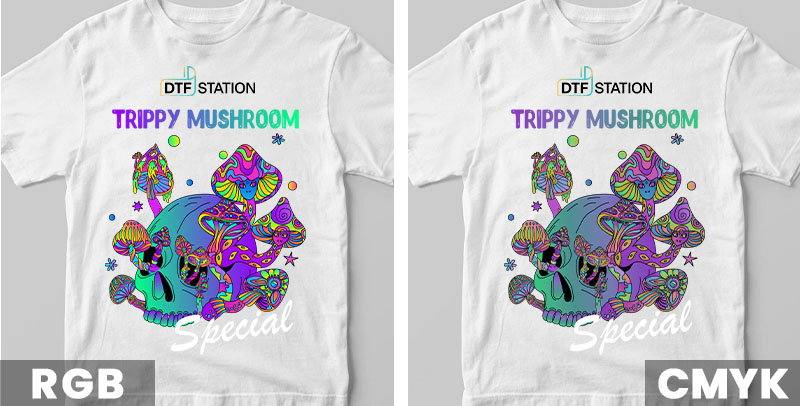 Choosing The Right Color Mode RGB VS CMYK
 Solution: Follow these color model best practices and they would help you avoid these issues.
- Work in RGB Mode: Start your design process in RGB mode to take full advantage of the wider color gamut, allowing for more vibrant and diverse color options.
- Preview in CMYK Mode: Always preview your design in CMYK mode to understand how the colors will shift when printed, ensuring you’re prepared for the final output.
- Save Files in sRGB Format: Save your DTF files in sRGB (standard) format and let professional-grade RIP software handle the conversion to CMYK for optimal color reproduction and vibrancy.
- Vector and Raster Designs: If your design is in vector format and started in CMYK, submit it as is to maintain color integrity. For raster designs in CMYK, convert to sRGB before adjusting levels for the best results.
Color accuracy is just one piece – master file setup, resolution and more in our design tips post.
B. ICC Profiles: The Color Translator
Many professionals in the printing industry are familiar with ICC profiles, but their precise function and benefits may not be widely understood. Essentially, an ICC profile serves as a color dictionary, translating digital color values (RGB or CMYK) into precise ink formulations that align with a printer’s unique behavior. This process accounts for critical factors such as:
- Ink-substrate interactions: How colors appear on specific materials (e.g., film or transfer adhesives).
- Printer-specific limitations: Variations in color reproduction across different devices.
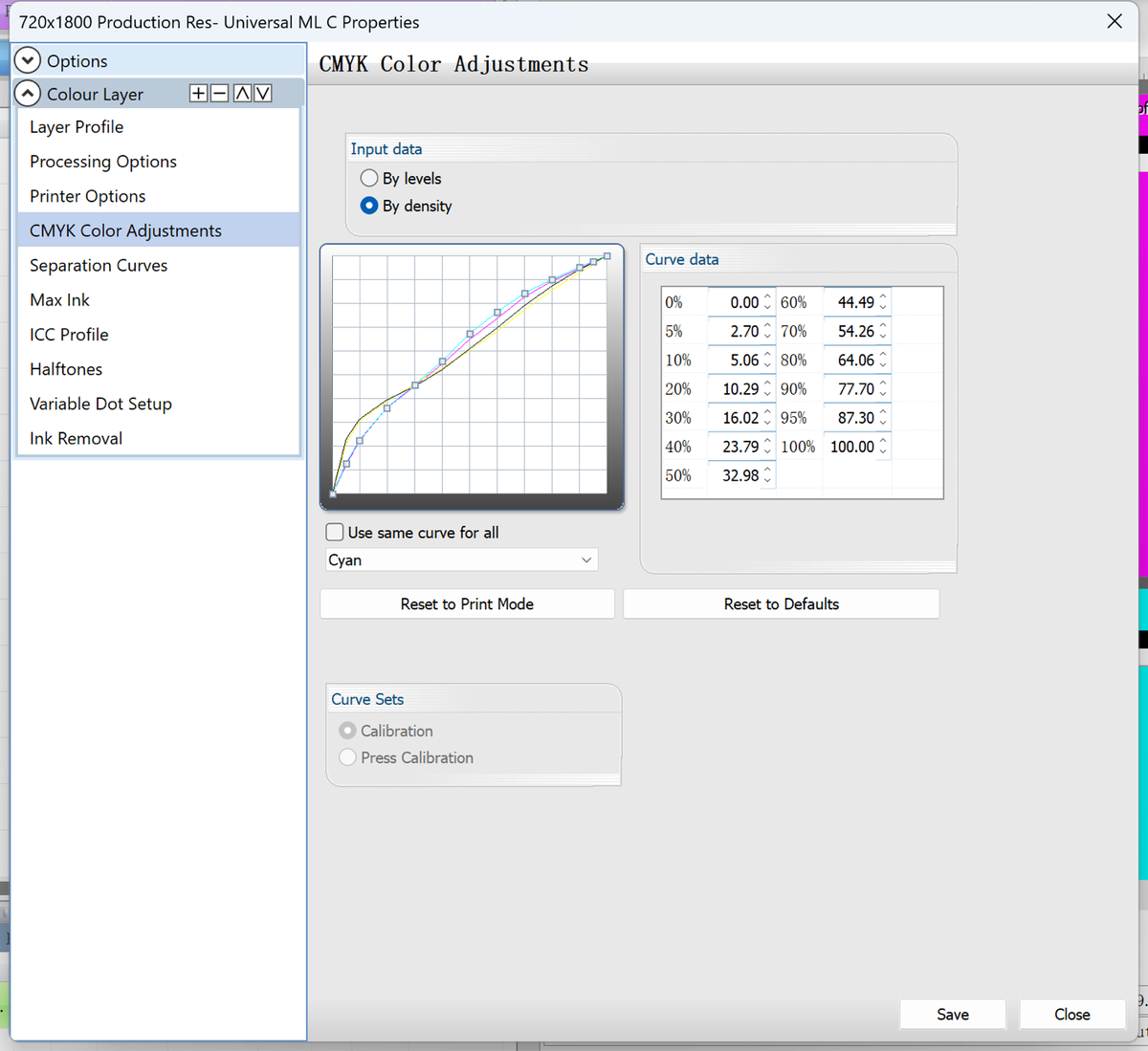
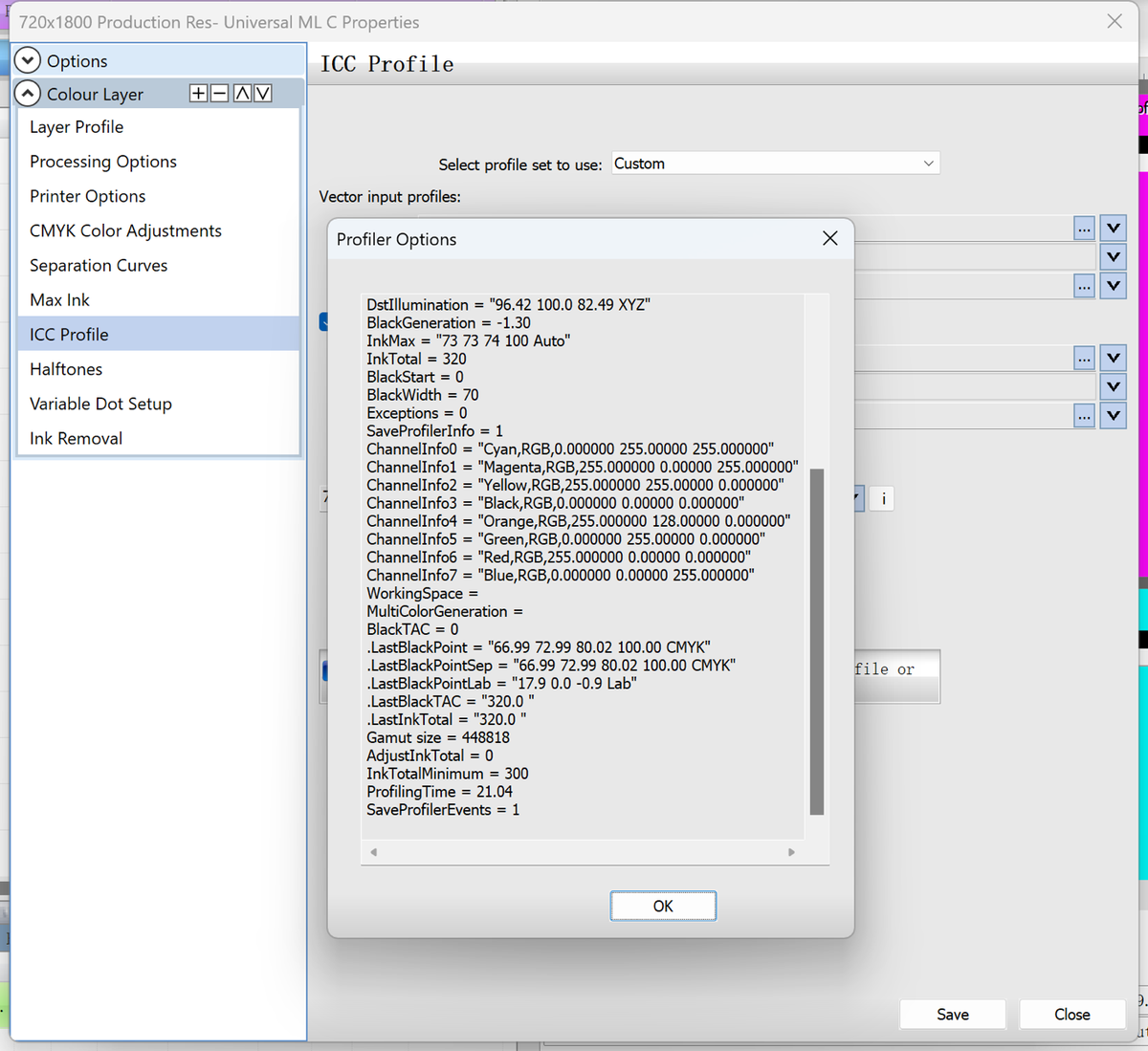
By leveraging ICC profiles, printers can achieve two key advantages:
- Optimized Color Vibrancy – Without proper profiling, colors may appear dull or inaccurate (e.g., a vibrant red printing as pink). ICC profiles refine ink combinations to maximize saturation and fidelity.
- Consistency Across Devices – Ensures uniform color output regardless of printer or material differences.
Industry research underscores their impact: Epson’s testing reveals that a well-calibrated ICC profile can expand a printer’s color gamut by up to 30% compared to generic profiles. Implementing these profiles is a best practice for achieving professional, repeatable results in color-critical applications.
Solution: While universal ICC profiles might deliver decent results, tailored ones can achieve the color accuracy required for your designs. This is why DTF Station spends so much time testing and calibrating ICC profiles for each printer—even creating additional profiles for different film types and inks. However, if you’re using universal profiles and want to make adjustments, the following guides may help:
| Problem | ICC Solution |
|---|---|
| Colors look washed out | Boosts ink density in critical channels |
| Skin tones appear orange | Adjusts magenta/yellow balance |
| Gradients look banded | Smooths transitions between ink limits |
C. Waveforms: The Ink Delivery Controller
Compared to ICC profiles, ‘waveform’ is a lesser-known term—even among some professional users. While ICC profiles define what colors to print by translating digital values (RGB/CMYK) into precise ink formulations, waveforms determine how those colors are applied. Waveforms control the behavior of ink droplets by regulating:
- Drop size – Influences ink density and coverage.
- Frequency – Adjusts the speed and spacing of droplet release.
- Shape – Affects droplet formation and placement accuracy.
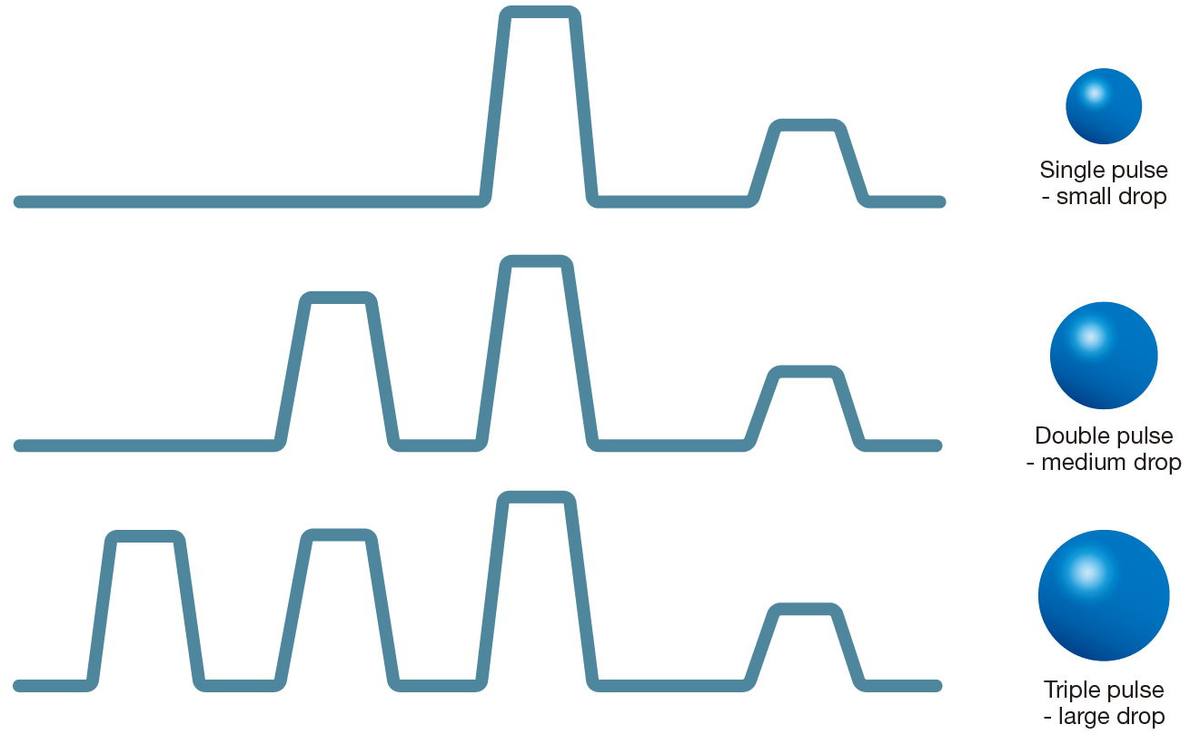 Typical Multi-pulse Waveforms in a Greyscale Printhead
 Optimizing the waveform is critical for achieving superior print quality, as it directly addresses common challenges such as:
- Preventing oversaturation/bleeding – Excessive ink can dull colors and blur edges; precise droplet control maintains sharpness and vibrancy.
- Enhancing color depth – Improved ink layering produces richer blacks (without grayish undertones) and more intense spot colors.
- Reducing graininess – Smoother gradients and transitions result from finely tuned droplet application.
Solution: By fine-tuning these parameters, waveforms work alongside ICC profiles to ensure both precise color accuracy and optimal ink deposition—critical factors in achieving high-quality prints. To help users maximize their waveform settings, DTF Station maintains ongoing collaboration with software providers, conducting extensive testing and customizing waveforms for our full range of DTF printers and consumables. However, if your printer uses a universal or generic waveform and you’d like to calibrate the settings for better results, we recommend consulting with your software provider for guidance.
D. RIP Software: Executes the Plan by ICC Profiles
Even with perfect ICC profiles, you’ll achieve nothing without reliable RIP software. Think of it this way: the ICC profile is like a recipe, while the RIP software acts as the chef. Just as a perfect recipe fails with poor execution, ideal ICC profiles won’t deliver results if your RIP settings aren’t properly configured.
After receiving ICC profiles, here’s how RIP software utilizes this color data:
- Color Conversion: The RIP converts RGB/CMYK designs into printer-specific ink values using the ICC profile. It applies gamut mapping to keep colors vibrant, like maintaining bright blues without dulling.
- Ink Optimization: The RIP controls ink limits to prevent oversaturation and adjusts black generation to avoid muddy shadows. This ensures clean, rich colors.
- Output Control: The RIP applies the ICC’s material-specific corrections, like adding extra magenta for polyester films, to maintain color accuracy across different substrates.
Solution: To fully leverage your ICC profiles’ potential, selecting reliable RIP software is crucial for your printing solution. At DTF Station, we’ve customized DigiRIP software specifically for our equipment and consumables – the same software provider used by Epson, Mimaki, and Brother. Currently, we’re evaluating a switch to neoStampa from a provider that specializes exclusively in textile industry design software, aiming to deliver even better color performance for our users.
E. Printer Performance: The Engine of Color Accuracy
Your printer’s physical condition serves as the foundation for color-accurate output. While digital color management handles the theoretical side, the printer’s mechanical execution determines real-world results. Following are some key considerations in this concern:
- Nozzle Health: Printer nozzles must remain clean for accurate color reproduction. Partial clogs in specific color channels create noticeable shifts – for example, weak magenta output causes greens to appear bluer. Visible streaks or banding in your prints serve as clear indicators that immediate head cleaning is required to restore proper function.
- Mechanical Precision: Proper printhead alignment is crucial for color fidelity. Misaligned heads produce visible color fringing, appearing as halos around edges, while also blurring fine details in your designs. To prevent these issues, conduct alignment tests weekly and always after transporting the printer.
- Ink System Integrity: The ink delivery system requires regular inspection for optimal performance. Air bubbles trapped in the ink lines disrupt consistent flow to the printheads, while damaged dampers fail to maintain proper pressure regulation. Both conditions lead to unpredictable color output and require prompt attention.
- Age-Related Factors: As printers age, their components experience natural wear. Printheads gradually lose droplet precision, reducing their dot placement accuracy, while older machines often need adjusted voltage or waveform settings to compensate for mechanical degradation. These factors significantly impact color consistency over time.
Solution: To ensure consistent color accuracy, implement a structured maintenance routine that includes daily nozzle checks to prevent clogs, weekly deep cleanings and printhead alignments, monthly ink system inspections (replacing dampers and purging lines as needed), and quarterly mechanical servicing of feed mechanisms and carriage rails. Always use manufacturer-approved cleaning solutions, document all maintenance activities with dates and batch numbers, and perform regular spectrophotometer calibrations to catch any gradual color drift. By investing in proactive, scheduled maintenance rather than reactive fixes, you’ll minimize color inconsistencies, reduce waste, and extend the lifespan of your equipment while delivering reliable, vibrant prints every time.
F: Consumables: The Hidden Variable in Color Accuracy
Now let’s examine how consumables impact color accuracy – the often-overlooked variable that can make or break your results. While you might have perfect profiles and a well-tuned printer, your media and inks fundamentally determine color performance.
DTF Ink: The chemical composition of your inks directly affects color vibrancy and stability. Different brands use unique pigment blends – a “cyan” from one manufacturer may print with different undertones than another. What makes Color Prime inks special is that our manufacturer carry full line of our printers and tests them exclusively on our printers during development, ensuring perfect color accuracy for our machines. While most brands might use inks tested on certain printers and assume they’ll work the same, but ours are fine-tuned specifically for our equipment, guaranteeing better, more consistent results.
DTF Film: Your transfer film or paper isn’t just a passive receiver – it actively interacts with inks. The media’s absorbency, texture, and coating chemistry all influence how inks cure and appear visually. Always test new material lots before full production runs.
Solution: To achieve optimal color accuracy, we recommend following your equipment supplier’s guidelines for using their approved consumables. If you switch to a different consumable supplier, be sure to conduct tests and calibrate both your ICC profiles and RIP software settings until you achieve your desired results.
Environmental Factors Affecting Color Accuracy
Environmental factors might be considered very trivial when compared with other factors but still play important roles in some cases in terms of color accuracy.
- Temperature: Temperature plays a crucial role – when below 18°C (64°F), inks thicken and cause poor saturation, uneven dots, and potential clogs, while the ideal range stays between 20-25°C (68-77°F) with minimal fluctuations.
- Humidity: Humidity creates different challenges depending on levels. High humidity above 65% RH slows drying and risks ink bleeding, while low humidity below 35% RH speeds nozzle drying and increases static dust attraction, both affecting color consistency.
- Lighting: Lighting conditions dramatically influence color perception. Standard fluorescent lights distort colors, requiring 90+ CRI daylight bulbs (5000K) at proofing stations, while sunlight exposure on prints leads to inaccurate color evaluation.
Solution: To achieve idea color produce, it’s important to maintain the working enviroment in idea condition, when necessary you might adopt environment controlling system to minimize its affacts to color precision.
Conclusion
Achieving perfect color accuracy in DTF printing isn’t just about having the right tools—it’s about mastering a precise workflow. From calibrating your monitor to fine-tuning ICC profiles, DTF color correction ensures your prints match your designs down to the smallest detail. By implementing the steps we’ve outlined—proper file setup, substrate testing, and consistent printer maintenance—you can eliminate guesswork and deliver professional-grade results every time. If this guide helped clarify the path to precision printing, share it with a fellow printer who might benefit—because in this industry, great results (and great knowledge) are worth spreading.